Your music, always in reach.

A menu bar controller for Spotify and Apple Music on Mac. Album art, playback and a live visualizer, always one glance away, with nothing in your Dock while you listen.

Includes VAT · 7 days free, no card needed · 14-day refund

Sonant pill in the macOS menu bar of a MacBook, playing Low Tide

This is the pill. It sits in your menu bar and controls whatever is playing.

How it works. Three steps, about a minute.

  1. 1

    Install Sonant

    Drag it to Applications. It lives in your menu bar and stays out of your Dock while you listen.

  2. 2

    Play something

    Open Apple Music or Spotify and hit play. Sonant detects which player is active.

  3. 3

    Control from the bar

    Play, pause, skip and seek from the pill, or with global shortcuts from any app.

Features. Everything one click from the menu bar.

Smart detection

Sonant sees whether Apple Music or Spotify is playing and brings in the artwork, title and artist on its own. Nothing to set up.

Global shortcuts

Play or pause, skip and go back from any app, without reaching for the mouse. More about shortcuts

Synced lyrics

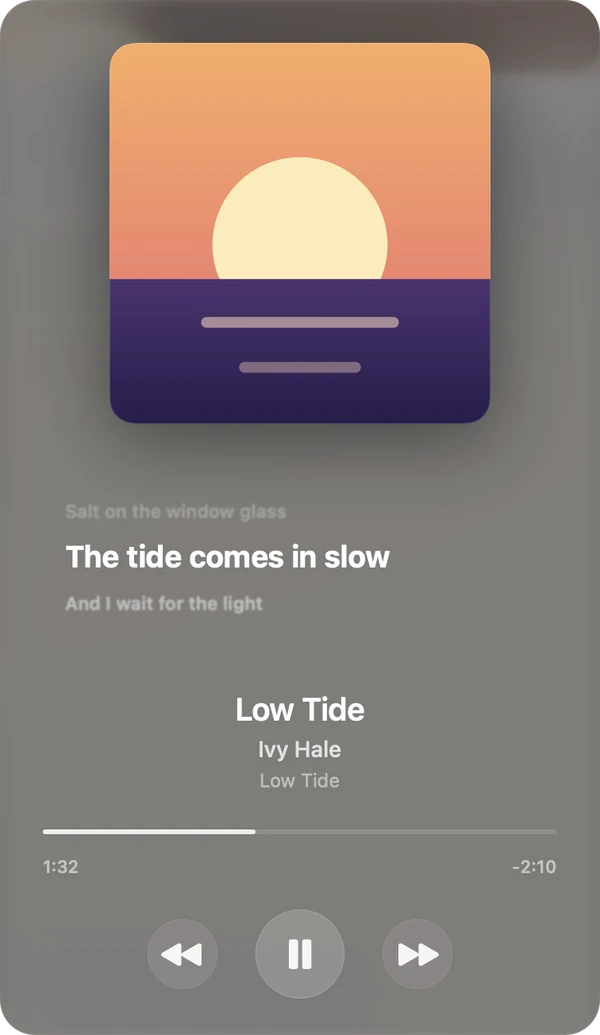
Hold the pill and the current line follows the song, in the preview and on the widget. More about lyrics

Sleep timer

Pick 15 to 90 minutes and the music pauses when the time is up. Made for falling asleep to a record. More about the sleep timer

Listening stats

Daily and weekly time, streaks and your top artists. Kept on your Mac and never sent anywhere.

Copy song link

One click copies a link that finds the current track on Apple Music or Spotify.
A closer look. Straight from the app.

Sonant's Now Playing preview with album art, the synced lyric line, track details and playback controls
Now Playing. Hold the pill for artwork, synced lyrics and a larger progress bar.
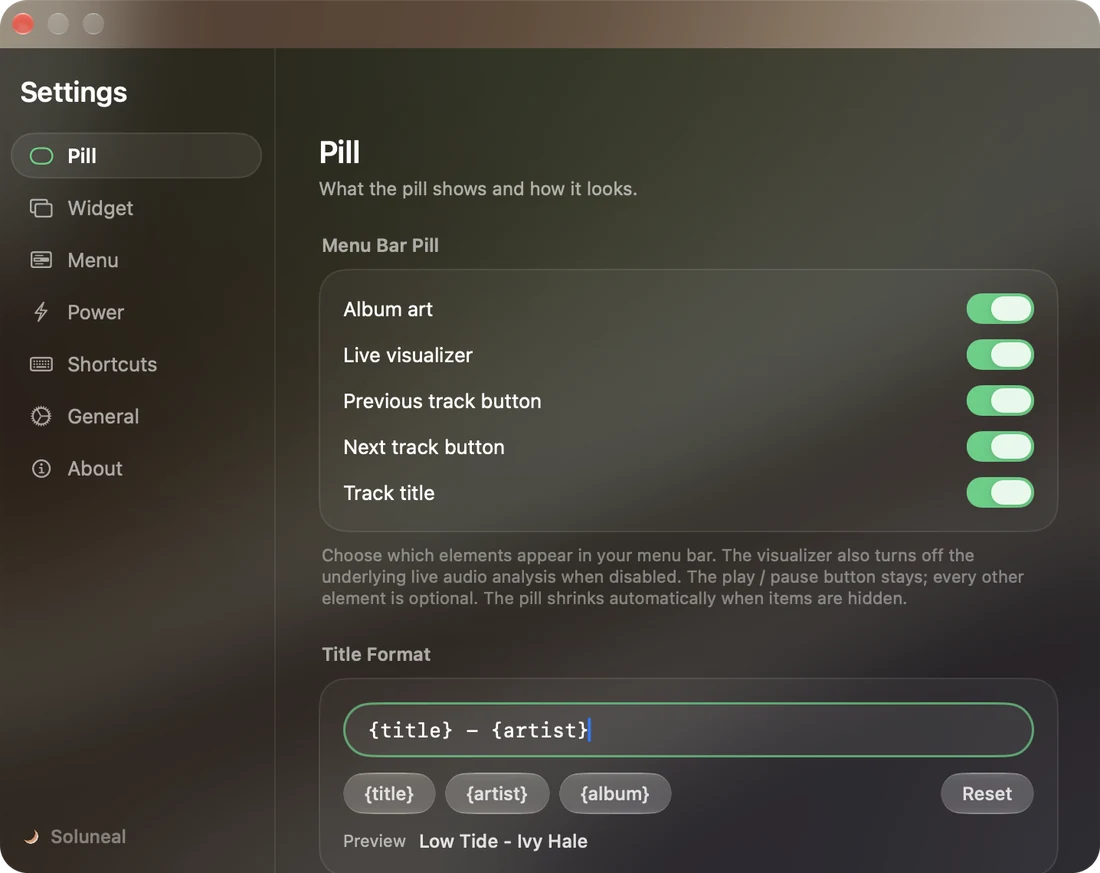
Sonant settings window where each part of the menu bar pill can be switched on or off and the title format edited
Settings. Choose what the pill shows and write your own title format.

The widget. Now playing, in a floating window.

A floating glass panel that stays with you across spaces and full-screen apps, with album art, the track, a progress bar, playback controls and the current lyric line. Show or hide each part, and drag it anywhere on your screen. More about the widget

Sonant widget: a floating Liquid Glass panel showing album art, track title, artist, progress bar, and transport controls

Live lyric line·Play, pause and skip·Drag the bar to seek·Stays on top if you want·Remembers its place

Power modes. Sonant follows your battery.

Three presets decide how hard the visualizer works. Sonant also follows macOS Low Power Mode on its own. More about the visualizer

Low Power

0 fps

Maximum battery life

The visualizer is off and Sonant checks the player less often. The pill still shows what is playing.

Normal Default

30 fps

Balanced and smooth

The visualizer runs at 30 frames per second. What most people want, most of the time.

Power User

60 fps

Smoothest visuals

The visualizer runs at 60 frames per second. Best when your Mac is plugged in.

Requirements·macOS 14.2 Sonoma or later·Apple Music & Spotify·Apple Silicon·~8 MB

Questions. Short answers.

Something not covered here? Write to [email protected].

Does Sonant work with both Apple Music and Spotify?
Yes. It auto-detects which player is active and pulls in the current track, artwork, and playback state. No configuration needed.
Can I choose what the pill shows?
Yes. In Settings you can show or hide the artwork, visualizer, buttons and title, write your own title format with {title}, {artist} and {album}, and let the pill grow to fit the title. There's also an optional floating widget with the current lyric line.
How do the trial and the license work?
Try it free for 7 days, no card needed. One purchase covers up to 5 Macs you own and every 1.x update. Refunds within 14 days, no questions asked.
Can I get Sonant on Setapp?
Yes. Setapp sells Sonant on its own as a yearly subscription. It is not part of the Setapp membership. Buying here is a one-time purchase that includes every 1.x update. The two are separate: a license from this site does not unlock the Setapp copy, and a Setapp subscription does not unlock this one.
Can I control playback with keyboard shortcuts?
Yes. ⌘⇧Space toggles play/pause, ⌃⌥⌘→ skips forward, ⌃⌥⌘← goes back. These work globally from any app.
What about the sleep timer?
Right-click the pill and choose a timer: 15, 30, 45, 60, or 90 minutes. When time's up, music pauses automatically.
Does it collect any data?
No. Sonant has no analytics and no telemetry. The only network requests it makes are for things you can see: album artwork, lyrics and update checks. None of them carry anything about you. The Setapp copy also includes Setapp's framework, which tells Setapp the app is in use.

Try Sonant free for a week.

Includes VAT · 7 days free, no card needed · 14-day refund